 mockvid
Start with the story, not the screens
Someone landing on a portfolio piece decides in a few seconds whether to keep reading. Before any visual, they should be able to answer four questions: who was this for, what problem did it solve, what exactly did you do, and what happened after launch.
Two or three lines at the top of the project cover it. For example: "Redesign and Webflow build for a Lyon architecture studio. I led the design and the build. Enquiries doubled in the three months after launch." That framing turns the visuals below it from decoration into evidence.
What to show from a website project
A website is not one image, so a single screenshot always undersells it. A complete project usually needs five things:
- The first screen. The hero is what the client's visitors see first, so it is what yours should see first too.
- A scroll through the page. This is where layout rhythm, typography and section transitions show. It is also the part a static image cannot carry.
- The mobile version. More than half of the site's traffic is probably on a phone. Showing desktop and mobile side by side proves the responsive work instead of claiming it.
- Two or three details. A hover state, a component, a type pairing, an animation you are proud of. Close crops make people slow down.
- A result, if you have one. Conversion, enquiries, load time, a client quote. One number beats a paragraph of adjectives.
Pick the right format for each spot
Each format has a job. The common mistake is using the quickest one everywhere.
| Format | Good for | Watch out for |
|---|---|---|
| Screenshot | Thumbnails, detail crops, grids | Shows one moment, nothing moves |
| Full-page screenshot | Long case studies, showing structure | Unreadable on a phone, people stop scrolling halfway |
| GIF | Short interaction loops inside a case study | Heavy files, limited colours |
| Screen recording | Walkthroughs, explaining a flow | Cursor, browser bars and jerky scrolling need an edit pass |
| Animated 3D mockup video | Hero of the case study, social posts, launch galleries | Keep it short so it loops cleanly |
| Link to the live site | Proof, and for visitors who want to explore | The site may change or go offline after handover |
If you are weighing a still mockup against a moving one, the 3D mockup vs static mockup guide goes deeper into where motion earns its place.
Where it goes: one project, four places
The same project usually lives in several places, and each one has its own shape.
- Your case study page. A 16:9 video as the hero, then the details and the story. This is the one place where you control everything, so give it the best version.
- Behance. Long vertical project pages that reward a sequence: hero visual, a scroll video, mobile screens, detail crops, results. Video and GIF modules are supported, so the moving version belongs at the top.
- Dribbble. A single shot, closer to a teaser. A 4:3 crop with the most striking moment of the site, and a link back to the full case study.
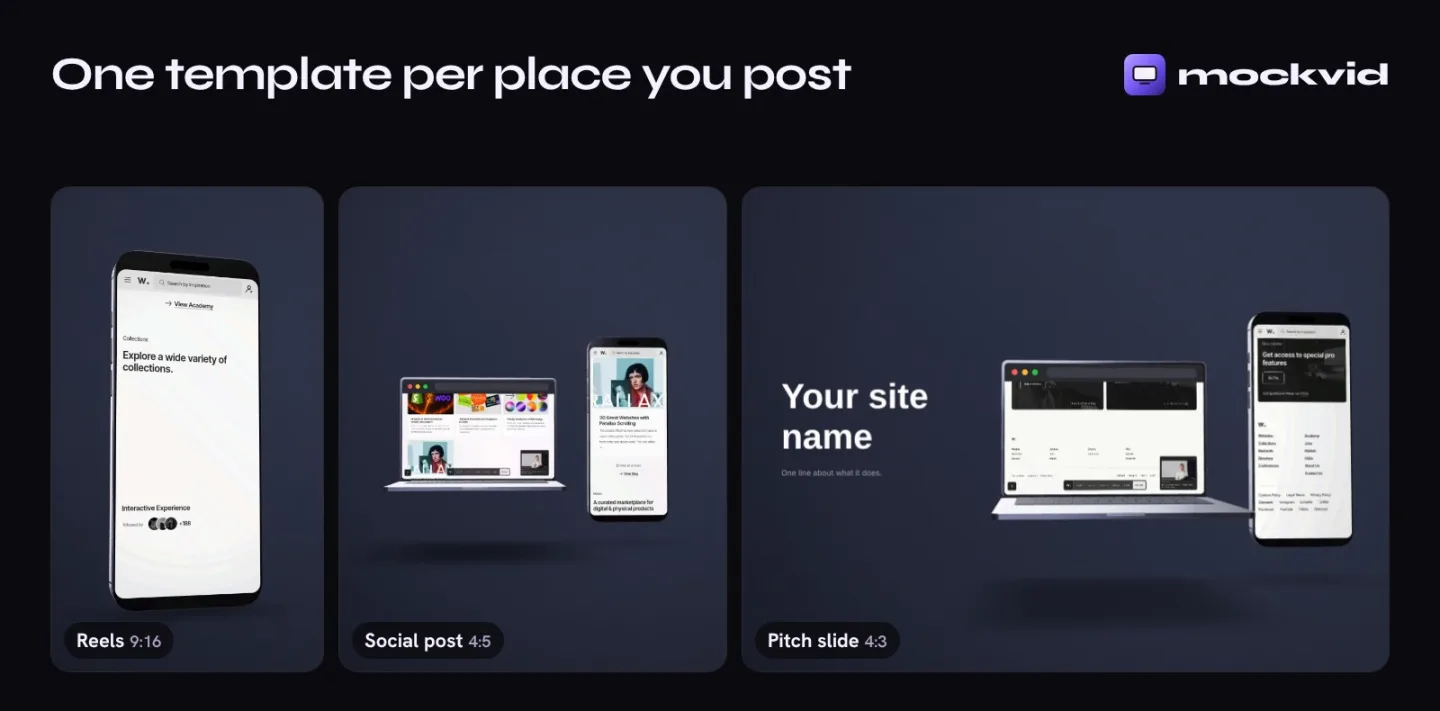
- LinkedIn and Instagram. Portrait formats take more room in the feed: 4:5 for posts, 9:16 for Reels. The LinkedIn guide and the Instagram guide cover what works on each.
Making the video part without a video editor
The moving visual is the part most designers skip, because it usually means recording the screen, cleaning up the take and cutting it in an editor. There are quicker ways.
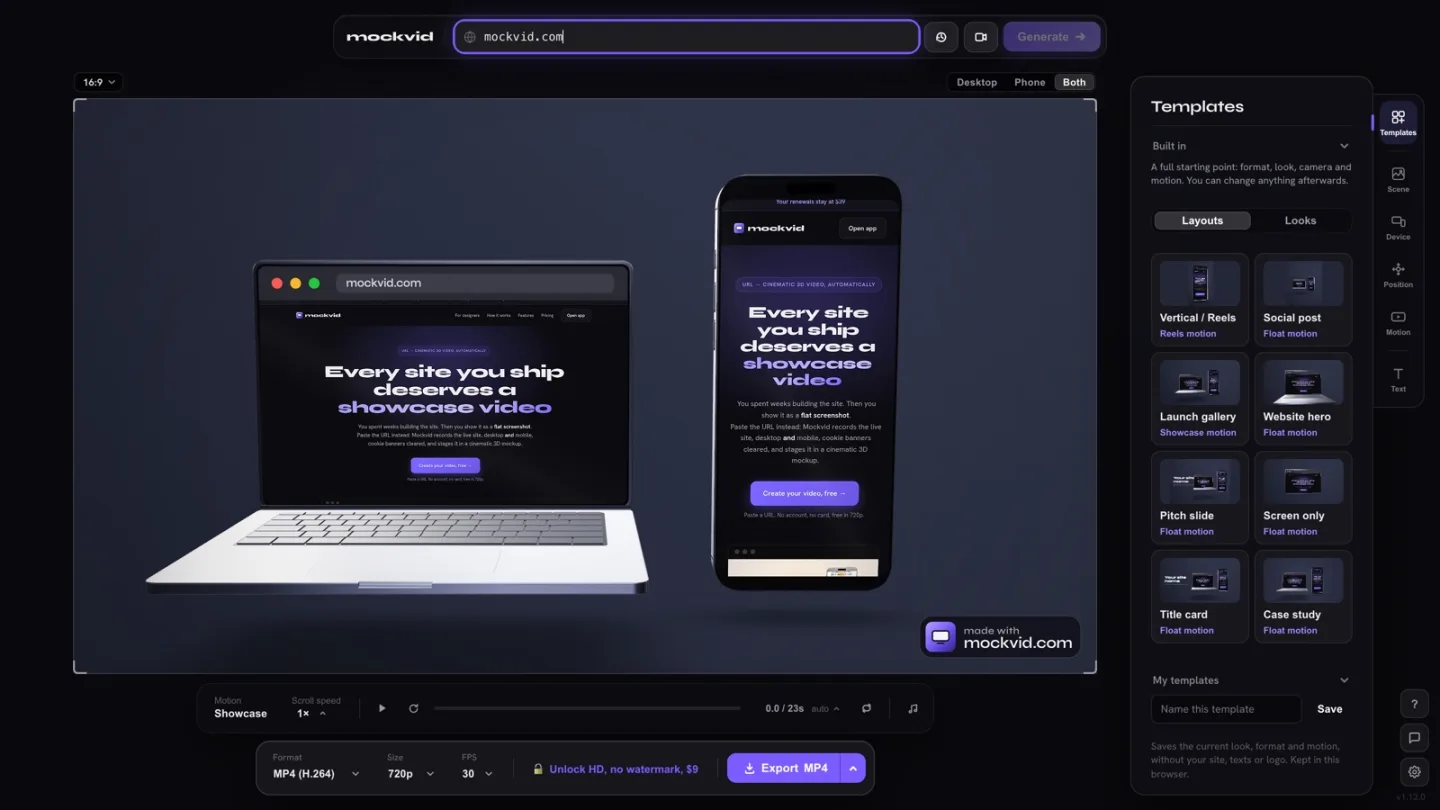
- Paste the live URL into a capture tool. Mockvid opens the page in a real browser, records it scrolling on desktop and mobile, and hides cookie banners before recording.
- Pick a template for the destination. Case study hero, 4:5 social post, 9:16 Reel or 4:3 slide. Each one sets the format, the devices, the camera and the motion, and you can change any of them afterwards.
- Export. MP4 or WebM in 720p for free, or HD up to 4K, GIF and transparent video with a paid plan.
Other options work too. A screen recorder such as Screen Studio gives you a polished walkthrough with cursor effects. If you already have a clean recording of the site, a 3D tool like Rotato can stage it on a device; the Rotato comparison covers when each approach makes sense.
Your site is already live.Turn it into a portfolio video from its URL.
Try it on your project →By platform: Webflow, Framer, WordPress
The advice above holds whatever the site was built with, but each platform has one thing worth knowing.
- Webflow. Interactions are often the point of the build, so a still image hides most of the work. Record the published URL so scroll-triggered effects play as designed. More in the Webflow portfolio guide.
- Framer. Framer sites lean on entrance animations. Let each section finish appearing before the scroll moves on, or the visual will show half-revealed blocks.
- WordPress. Client sites tend to change after handover, through new plugins, content and banners. Capture at launch and keep the file, because the live site six months later may not be your work anymore.
Mistakes that make good work look average
- A dead or rewritten live link. Check your portfolio links twice a year. A 404 or a site the client redid without you undermines everything above it.
- Desktop only. Leaving out mobile suggests it was not considered, even when it was.
- A two-minute video. Nobody watches a website scroll for two minutes. Keep the hero video short and let the case study text do the explaining.
- Heavy files. A 40 MB GIF at the top of a case study makes the page slow on exactly the phones you are trying to impress. Prefer compressed MP4 or WebM.
- Pop-ups and cookie banners in the shot. They are the first thing people notice. Hide them before you capture.
Frequently asked
Should I link to the live site or show a recording?
Both. The recording is what people actually watch, because it loads instantly and shows the site at its best. The live link proves the project is real and lets curious visitors explore. Put the visual first and the link right under it.
What if the client changed the site after launch?
Capture your version as soon as the site goes live and keep the files. If you missed that window, show the parts that are still yours, say in the text what you delivered and when, and skip the live link if the current site no longer reflects your work. A handoff video recorded at launch doubles as that archive.
How long should a website portfolio video be?
Between 8 and 20 seconds for a hero or a social post. Long enough to show the first screen, a scroll through the key sections and the mobile version, short enough to loop without anyone reaching for the pause button.
Can I show a website that is under NDA?
Only with the client's written permission. If you get it with conditions, hide the sensitive parts before you record: client names, figures, unreleased content. Many capture tools, Mockvid included, let you hide sections of a page before recording.
Do I need a different visual for every platform?
You need different crops, not different content. Make one good capture of the site, then export it in the ratio each place expects: 16:9 for your case study page, 4:5 for Instagram and LinkedIn, 4:3 for Dribbble and slides, 9:16 for Reels.
Freelancers showing a few client sites a year should look at the per-site pricing on the web designers page; studios with a full book of work may prefer the agencies plan.