 mockvid
One clip, any background
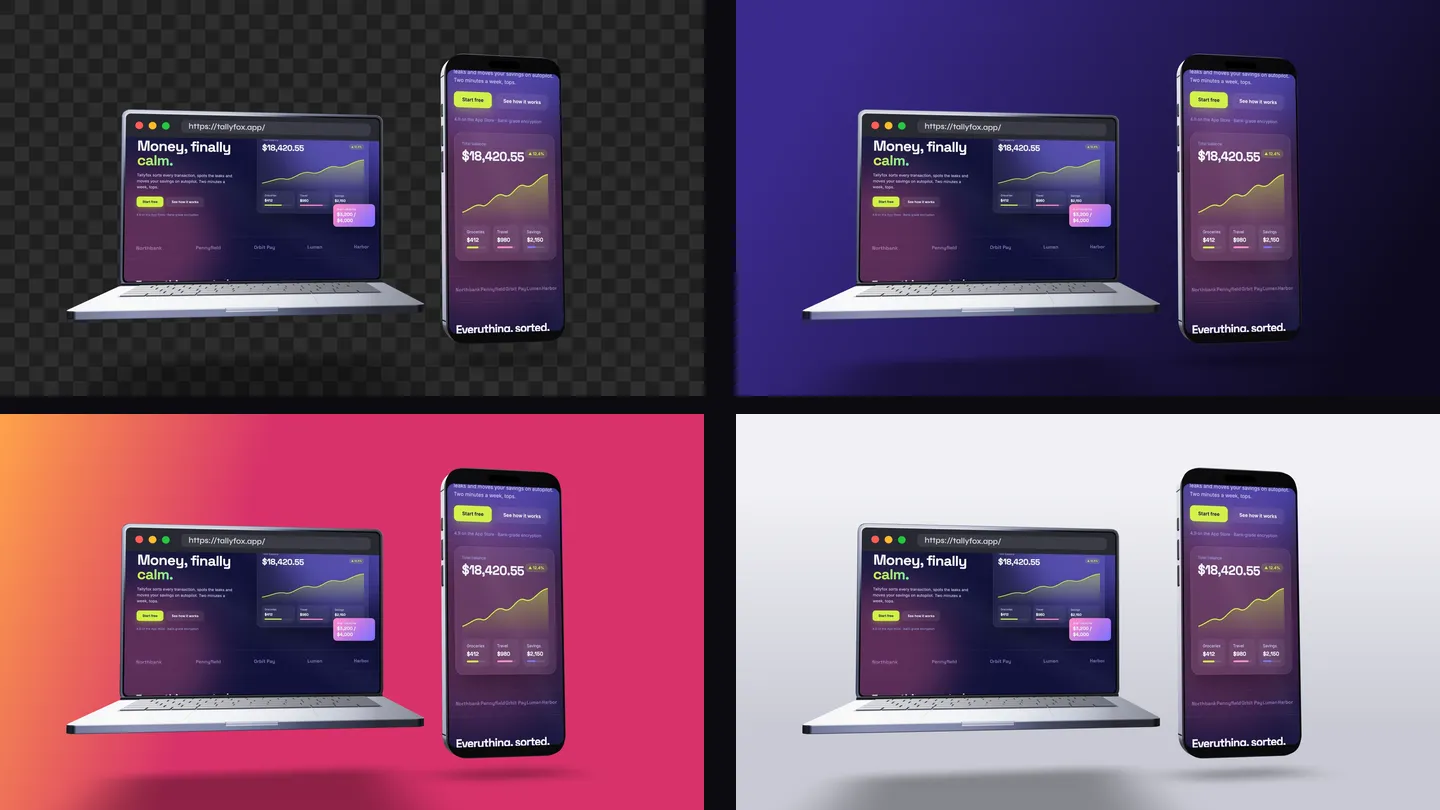
A finished mockup video carries its own scene: a backdrop, a floor, a lighting mood. That is exactly what you want for a post, and exactly what gets in the way when the mockup is one layer of a bigger edit. You end up matching your brand to the mockup instead of the other way round.
The transparent export keeps the part that is hard to make yourself, the devices, the live site on their screens and the camera move, and leaves the rest to you. Put it over a client's brand colour, a gradient you animate, a filmed background or a slide in a launch video.
Which format to pick
| Format | Made for | Opens in |
|---|---|---|
| MOV transparent ProRes 4444 with alpha | Video editing and motion design | Premiere Pro, Final Cut Pro, DaVinci Resolve, After Effects, QuickTime |
| WebM transparent VP9 with alpha | Websites and web apps | Chrome, Edge, Firefox (not Safari) |
| Transparent PNG still frame | Thumbnails, slides, case-study images | Anything that opens images |
If you are not sure, take the MOV. ProRes 4444 is the format editors expect for footage with transparency, and it is the one that survives a round trip between apps without the alpha being dropped or misread.
Where to find it
Generate your mockup, pick a motion, then open the Format menu in the export bar and choose MOV transparent (video editors) or WebM transparent (websites). The transparent PNG sits in the snapshot options next to it.
Keep the tab open while the frames render: each one is drawn at full quality, so a 30-second clip takes a few minutes.
Using it in your editor
- Premiere Pro. Import the MOV and place it on a track above your background. The transparency is read on import, nothing to set.
- Final Cut Pro. Connect the clip above your background in the timeline. ProRes 4444 is Apple's own alpha format, so it composites straight away.
- DaVinci Resolve. Put the clip on a video track above your background. If the edges ever look dark, open the clip's attributes and set the alpha mode to Straight.
- After Effects. Import the MOV as footage. If it asks how to interpret the alpha, choose Straight.
- On a website. Use the WebM in a
<video autoplay muted loop playsinline>tag. Safari does not play VP9 alpha, so add a poster image as a fallback.
What stays in the frame
| Transparent export | |
|---|---|
| Laptop and phone, with your site playing on the screens | Kept |
| Camera motion and device animation | Kept |
| Soft contact shadow under the devices | Kept, semi-transparent (can be turned off) |
| Your text and logo overlays | Kept |
| Background, floor reflection, depth blur, glow, grain | Left out, for your own background |
| Watermark | Never added |
The edges of the devices are rendered with extra samples, so the alpha is smooth on any background, light or dark, without the stair-stepping you get from a rough cut-out.
Put your last project on your own background.Free to generate, no account.
Paste a URL →Limits
- Up to 1080p at 30 fps. Opaque MP4 and WebM go up to 4K; transparent video stops at 1080p.
- Up to 30 seconds per clip. Long enough for a shot in an edit; loop it or chain two takes if you need more.
- Every aspect ratio. 16:9, 9:16, 4:5, 1:1 and 4:3, so the clip fits a YouTube edit, a Reel or a slide.
- Large files. ProRes 4444 is near lossless, so a 30-second 1080p MOV can weigh several hundred megabytes. Export your final edit to MP4 to share it.
- Paid plans only. Previewing is free; transparent video and PNG come with the one-time $9 unlock for a site, or with Studio for every site you capture.
Who uses it
Web designers drop the clip into portfolio reels and case-study films on their own brand background. Agencies and studios composite it into client launch videos and pitch decks. Founders layer it over product videos for Product Hunt and social. If you would rather have the scene done for you, the website mockup video page covers the finished, ready-to-post version, and the website scroll recording gives you the flat footage with no device at all.
FAQ
Is it a real alpha channel or a green screen?
A real alpha channel. The background is never drawn, so there is nothing to key out: no green spill on the device edges, and the soft shadow under the devices stays semi-transparent.
Which format should I pick for Premiere, Final Cut or DaVinci Resolve?
MOV transparent. It is Apple ProRes 4444 with alpha, which Premiere Pro, Final Cut Pro, DaVinci Resolve, After Effects and QuickTime all read with the transparency intact. WebM transparent is meant for websites.
Can I put a transparent WebM on my website?
Yes, in a muted, looping video tag. Chrome, Edge and Firefox show the transparency. Safari does not play VP9 alpha, so give Safari visitors a poster image or an MP4 on a matching background.
Why is the MOV file so large?
ProRes 4444 is an editing codec: nearly lossless, with a full-quality alpha channel, built to be cut and composited rather than streamed. A 30-second clip at 1080p can reach several hundred megabytes. Export your final edit to MP4 for sharing.
What are the limits of the transparent export?
Up to 1080p, 30 fps and 30 seconds, in every aspect ratio: 16:9, 9:16, 4:5, 1:1 and 4:3. Each frame is rendered at full quality, so a long clip takes a few minutes to prepare.
Is the transparent export free?
Generating and previewing the mockup is free with no account. Transparent video and transparent PNG come with any paid plan, starting with the one-time $9 unlock for a site. Studio covers every domain you capture.
What stays in the frame and what is removed?
The devices, the site playing on their screens, the camera motion, the soft contact shadow, and your text and logo if you added them. The background, floor reflection, depth blur, glow, grain and watermark are left out so they never fight your own background.