 mockvid
What a scrolling screenshot misses
The usual way to make a scrolling mockup is to take a full-page screenshot and slide it inside a device frame. On a static page that works. On a site with motion design, the part you were proudest of is exactly what disappears:
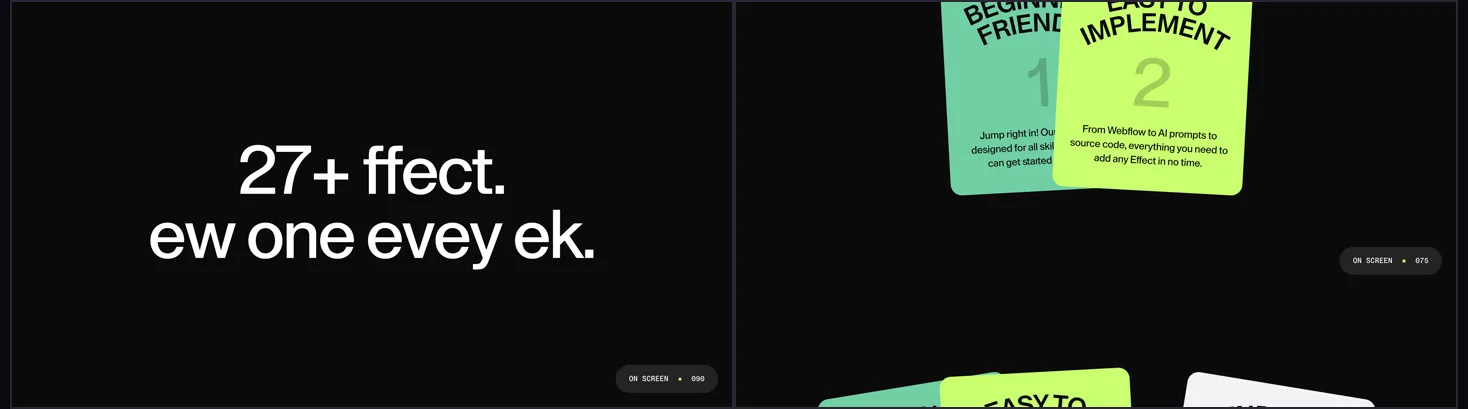
- Text that animates in is caught halfway, with letters missing.
- Pinned and scrubbed sections repeat or get sliced where the screenshot was stitched together.
- Video backgrounds stay on one frame, and lazy-loaded images can stay blank.
- Parallax and smooth scrolling flatten into a picture moving at one speed.
What live capture records
Mockvid opens your site in a real browser and records it scrolling from top to bottom, on desktop and on mobile. The page runs as it does for a visitor, so the video shows what the site actually does:
- Scroll-triggered reveals, pinned sections and scrubbed timelines, in motion.
- Parallax layers and smooth-scroll libraries, at the pace the site sets.
- Video backgrounds playing, and canvas or WebGL scenes rendering.
- The real mobile layout, with its own animations, recorded from the same URL.
- A steady, even scroll, with cookie banners cleared and lazy-loaded content in place.
The recording then goes into a 3D website mockup video, or you can download it as a plain website scroll recording.
Screenshot tools, screen recorders and live capture
| Scrolling screenshot | Screen recorder | Mockvid live capture | |
|---|---|---|---|
| Scroll animations and parallax | Frozen | Yes | Yes |
| Video backgrounds | One frame | Yes | Yes |
| Even scroll, no cursor in frame | Yes | By hand | Yes |
| Mobile version | Separate screenshot | Separate recording | Same capture |
| 3D device mockup | Depends on the tool | No | Yes |
| Time to get it | Seconds | Minutes, plus editing | A few minutes, no editing |
See your own animations in a mockup.Free to capture, no account.
Paste a URL →Made for sites with motion
Live capture matters most when the motion is the work: an award-style portfolio, a Webflow site full of interactions, a launch page built with GSAP and ScrollTrigger, a Framer site with scroll effects, a product page with a WebGL hero. Web designers use it to show the interactions they built in a portfolio or a case study. Studios use it to present a finished client site. For a quieter page, a scrolling website mockup does the same job.
Honest limits
- YouTube and Vimeo embeds appear as their still thumbnail.
- Logins and hard paywalls cannot be reached: use a public preview or staging link.
- Some sites block automated browsers. Mockvid tells you before the capture starts, and you can upload your own screen recording into the same 3D scene.
- Very heavy sites are recorded at a lighter resolution, so the scroll stays smooth.
- Interactions that need a click or a hover are not triggered: the capture records a scroll of the page.
FAQ
Why do animations disappear in a scrolling screenshot mockup?
A screenshot is one still image of the page. Scrolling it in a device frame moves the picture, but nothing on the page changes: text that animates in stays half drawn, pinned sections repeat or break where the image was stitched, and video backgrounds stay on a single frame.
Which kinds of animation does Mockvid capture?
What the page does while it scrolls: scroll-triggered reveals, parallax, pinned and scrubbed sections, smooth-scroll libraries, video backgrounds, and canvas or WebGL scenes. Sites built with Webflow interactions, Framer, GSAP and ScrollTrigger or custom code are recorded as they run in a browser.
Does it also capture the mobile version?
Yes. Each capture records the desktop and the mobile site from the same URL, so the phone in your mockup shows the real responsive layout with its own animations, not a scaled-down desktop.
Is there anything it cannot show?
Embedded YouTube and Vimeo players appear as their still thumbnail. Pages behind a login or a hard paywall cannot be reached, and a small share of sites block automated browsers; for those you can upload your own screen recording instead. Very heavy sites are recorded at a lighter resolution so the scroll stays smooth.
Why does a capture take a few minutes?
Because the site is actually recorded from top to bottom, on desktop and on mobile, rather than photographed in one shot. The Generate window shows the expected time for your site before you start, and you can watch each screen being recorded.
Is it free?
Capturing and previewing any site is free and unlimited, with no account. Free exports are 720p with a small watermark, on two sites a month. A one-time $9 unlock per site, or Studio for every site, adds HD up to 4K, 60 fps and the raw desktop and mobile recordings.
Site shown in the video: madewithgsap.com, captured on November 23, 2026. Mockvid is not affiliated with Made With GSAP.